Our Top Picks
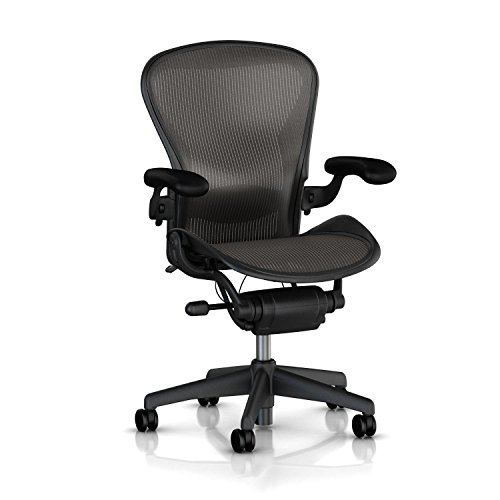 Herman Miller Aeron Executive Office Chair-Stainless SteelSize B (Medium)17 x 27 x 42 inches48 poundsCheck on Amazon
 Herman Miller Classic Aeron Task Chair: Highly AdjSize B (Medium)17 x 27 x 42 inches48 poundsCheck on Amazon
The best chair for posture correction for most desk workers is a fully adjustable ergonomic task chair with independent lumbar depth and height adjustment, a seat pan you can slide, and recline tension control, because it supports your spine in multiple postures throughout the day rather than locking you into one “correct” position. A chair that helps with posture doesn’t straighten your back for you — it makes it easier to maintain a neutral spine while you move, shift, and work for 6 to 8 hours without fatigue.
What “Posture Correction” Actually Means in a Chair
Good posture at a desk is not sitting bolt upright at 90 degrees. Research on spinal loading shows the least disc pressure comes from a reclined posture around 100 to 110 degrees between torso and thighs, with your lumbar curve preserved, feet flat, and elbows close to your sides. A chair that helps with posture does three things consistently:

Herman Miller Classic Aeron Chair - Size B, Posture Fit
Chosen because it specifies Size B and Posture Fit.
View on AmazonHerman Miller Aeron Executive Office Chair-Stainless Steel, Size B-Fully Adjustable Arms-lumbar Support Open Box
Chosen because it specifies Size B-Fully Adjustable Arms-lumbar Support Open Box.
View on AmazonHerman Miller Classic Aeron Task Chair: Highly Adj w/Lumbar Pad - Tilit Limiter w/Seat Angle Adj - Fully Adj Vinyl Arms - Carpet Casters
Chosen because it specifies Tilit Limiter w/Seat Angle Adj and Fully Adj Vinyl Arms.
View on Amazon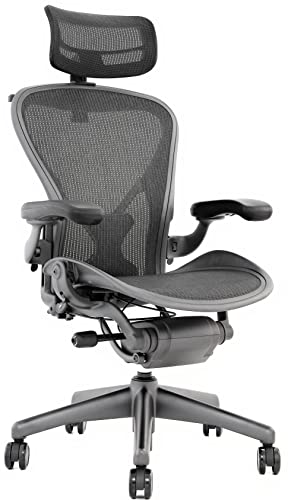
Aeron Chair by Herman Miller - Highly Adjustable Graphite Frame - with PostureFit - Carbon Classic (Medium)
Chosen because it specifies Highly Adjustable Graphite Frame and with PostureFit.
View on Amazon- Maintains your natural lumbar lordosis without you having to think about it
- Keeps your thighs roughly parallel to the floor or slightly declined, with 2 to 3 inches of clearance between the seat edge and the back of your knees
- Allows micro-movement — recline, tilt, and shift — so your muscles don’t lock up
If a chair forces you into one rigid position, even if it feels “correct” for 20 minutes, it will usually cause more aching over a full workday than a chair that encourages subtle movement.
The 3 Types Compared: Ergonomic vs. Kneeling vs. Lumbar-Support
These three categories are marketed for posture, but they work very differently.
1. Full Ergonomic Task Chair
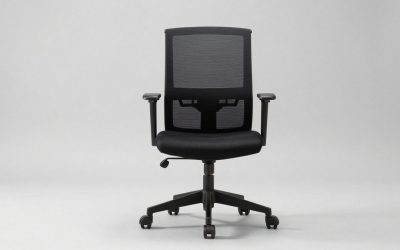
This is the adjustable office chair with a mesh or foam back, armrests, and multiple levers. Examples include mesh designs like the Herman Miller Aeron, Steelcase Leap, and Haworth Fern — all widely available chair types in 2026. The key is adjustability: you can tune it to your body instead of adapting your body to it.
Best for: All-day desk work (6+ hours), people with existing lower back stiffness, and anyone who shares a desk setup with varying tasks like typing, reading, and video calls.
2. Kneeling Chair
A kneeling chair drops your thighs to about a 60 to 70 degree angle and distributes weight between your sit bones and shins. It opens the hip angle and automatically tilts the pelvis forward, which can reduce slouching without a backrest.
Best for: Short to medium sessions (1 to 3 hours), people who tend to perch forward anyway, and as a secondary chair to rotate with a standard task chair. It is not ideal for all-day use for most people because it increases pressure on the knees and shins and offers no upper back support.
3. Lumbar-Support Task Chair (Fixed or Limited Adjustment)
This category includes executive-style chairs, gaming-style chairs, and budget office chairs that advertise “lumbar support” but offer it as a fixed cushion or a simple up-down pad rather than depth-adjustable support. They look supportive but often push too hard on one spot or miss your lumbar curve entirely if you are taller or shorter than average.
Best for: Light use under 4 hours a day, conference rooms, or when budget is the primary constraint. For true posture correction, fixed lumbar is the least effective of the three.
| Feature | Full Ergonomic Chair | Kneeling Chair | Fixed Lumbar-Support Chair |
|---|---|---|---|
| Seat Height Range | 16 – 21 inches (pneumatic) | 20 – 28 inches (angled post) | 17 – 20 inches |
| Backrest Recline | 95 – 125 degrees, with lock | No backrest | 90 – 115 degrees, often single lock |
| Lumbar Adjustment | Height + Depth (1.5 – 2.5 in range) | None (posture from hip angle) | Height only or fixed pillow |
| Footprint (W x D) | 26 x 26 inches | 22 x 28 inches | 27 x 27 inches |
| Typical Weight Limit | 250 – 350 lbs | 200 – 250 lbs | 225 – 300 lbs |
| Ideal Continuous Use | 6 – 10 hours | 1 – 3 hours | 3 – 5 hours |
| General Market Range | usually $400–$1,400 | usually $100–$350 | usually $150–$500 |
Decision Criteria That Matter More Than Marketing
Ignore buzzwords like “orthopedic” or “posture-correcting.” Check these five criteria instead:
1. Lumbar Tunability
Your lumbar curve sits roughly 6 to 9 inches above the seat pan, but the exact height varies by torso length. A good chair lets you move the lumbar support up and down at least 3 inches and in and out by 1 to 2 inches. If you can only add a pillow, you cannot fine-tune pressure, and too much pressure is as bad as too little.
2. Seat Depth and Height Fit
Seat depth should leave that 2 to 3 inch gap behind your knees. Many ergonomic chairs offer a seat slider with 2 to 3 inches of travel (usually 15 to 18 inches deep). Seat height needs to match your desk: standard desks are 28 to 30 inches high, which pairs with a 17 to 19 inch seat height for most people 5’4″ to 6’0″. If your desk is higher, you will need a footrest to avoid dangling feet, which pulls your lumbar out of alignment.
3. Recline, Not Just Upright Lock
A chair that locks only upright forces static loading on your spine. Look for synchro-tilt where the back reclines faster than the seat, plus tension adjustment so you can lean back without pushing hard. You should be able to recline to at least 110 degrees and still reach your keyboard without hunching.
4. Armrest Adjustability
Fixed armrests that are too high shrug your shoulders; too low and you lean sideways. For posture, you need height, width, and pivot adjustment so your elbows can rest at about 90 to 100 degrees with forearms parallel to the floor while typing.
5. Breathability and Foam Density
For 8-hour comfort, material matters. Mesh stays cooler and sags less over time, while foam feels plusher initially but compresses.
| Material / Construction | Pros for Posture & Comfort | Cons & What Wears First |
|---|---|---|
| Mesh Suspension (back and seat) | Excellent airflow, consistent support, no foam compression, conforms without pressure points | Can feel too firm at first; cheaper mesh stretches and hammocks after 2–3 years |
| High-Density Foam (50–60 kg/m³) | Cushioned feel, good for 4–6 hour sessions, quieter than mesh | Retains heat; compresses 15–25% over 3–5 years, especially at seat edge; fabric pilling |
| Low-Density Foam (under 35 kg/m³) | Soft initial sit, lower cost | Bottoms out quickly, loses lumbar shape in under 18 months, poor all-day support |
| Fabric Upholstery (woven polyester/wool blend) | Warm, textured, hides wear well | Absorbs dust and pet hair; harder to clean than vinyl or mesh |
| Faux Leather / Vinyl | Wipe-clean, professional look | Traps heat and sweat, cracks/peels in 3–4 years in sunny rooms |
Pick by Your Situation: A Decision Matrix
The right chair that helps with posture depends on your room, body, and workday more than on a single “best” model.
| Your Situation | Best Pick | Why |
|---|---|---|
| Small apartment or 10×12 ft home office with a 48-inch desk | Compact ergonomic chair (26-inch base) or folding kneeling chair as secondary | Full-size executive chairs need 36–42 inches of pull-out clearance behind the desk and overpower small rooms |
| Renter who moves yearly, narrow doorways (28–30 inches) | Mesh ergonomic chair that ships in a flat box and assembles without tools | Solid wood or heavy frame chairs can weigh 55–70 lbs boxed and will not fit through tight hallways assembled |
| Back pain when sitting longer than 2 hours | Full ergonomic chair with depth-adjustable lumbar + seat slider | Allows you to unload the spine by reclining 10–15 degrees periodically, which fixed chairs prevent |
| Kids and pets at home, need durability and easy cleaning | Mesh back + fabric seat with removable cover, metal 5-star base | Mesh resists claws and hair better than faux leather; metal base handles tipping and rough use |
| Want to actively improve forward-head posture on a budget | Kneeling chair for part of the day + standing desk converter | Creates posture variety for usually $100–$350 without committing to one expensive system |
| Tall (over 6’2″) or heavy (over 250 lbs) | Large-frame ergonomic chair, 350 lb rating, 19–22 inch seat height | Standard cylinders and seat pans are too short and shallow, forcing you to slouch to reach the floor |
Fit, Clearance, and Assembly Realities No Listing Tells You
Before you buy, measure these three things:
- Desk and chair height pairing: Sit with feet flat and measure from floor to the underside of your desk. You need at least 25 to 27 inches of knee clearance. If your chair at its lowest is 17 inches and your desk is 29 inches, you will have about 12 inches of lap clearance — ideal. If your desk is 30+ inches, you may need to raise the chair and add a footrest.
- Room clearance: A rolling chair needs 30 to 36 inches behind the desk to recline and push back, plus 24 inches on the side to get in and out. In a 10×12 ft room with a bed or bookshelf, that often means placing the desk facing the wall with the chair in the center, not tucked in a corner.
- Doorway and box size: Most ergonomic chairs ship in a 26 x 26 x 20 inch box weighing 35 to 55 lbs. Kneeling chairs ship smaller at 22 x 18 x 14 inches and 15 to 20 lbs. If your building has a 28-inch doorway or a fourth-floor walkup, that weight and size matters for delivery and assembly.
Assembly is usually 15 to 30 minutes with an included Allen key: base, casters, cylinder, mechanism, back. What wears first is predictable: casters and cylinder lose smoothness in year 2 to 3, foam compresses at the front edge, and mesh tension loosens if tension knobs are overtightened. Chairs with replaceable casters, cylinders, and lumbar pads last 7 to 10 years; chairs with riveted plastic parts rarely last beyond 3 to 4 years of daily use.
How to Set Up Any Chair for Better Posture in 5 Minutes
Even the best chair for posture correction will not help if it is set to the wrong height.
- Set seat height so your hips are level with or slightly above your knees and feet are flat — no pressure under your thighs.
- Adjust seat depth to that 2 to 3 inch gap behind the knees. If no slider, add a small lumbar pillow to effectively shorten the depth.
- Raise the lumbar support until its firmest point sits in the curve of your lower back, about belt level, then dial depth until you feel gentle contact, not pushing.
- Set armrests so elbows hover just above them while typing; your shoulders should not rise to meet the rests.
- Recline to about 105 degrees for most work, then sit upright for 20-minute bursts of focused typing. Change recline angle at least every 30 to 45 minutes.
If you feel tingling in your legs, the seat is too high or too deep. If your upper back aches, recline a bit more and bring your monitor up so the top third is at eye level — posture is a system of chair, desk, and screen, not just the chair.
What Not to Expect
No chair permanently “corrects” posture on its own. Muscles that have been tight for years — hip flexors, chest, upper traps — need movement, walking breaks, and strength work to change posture long-term. Think of the chair as a tool that removes friction: it holds your spine in a neutral window so you can build better habits without fighting your furniture all day.