The Short Answer
A 75-inch television measures about 66 inches (168 cm) wide and 38 inches (97 cm) tall, so the stand under it should be at least 70 inches (178 cm) wide and preferably 75 to 80 inches (191 to 203 cm). The stand needs to be 20 to 24 inches (51 to 61 cm) tall to put the screen center near 42 inches for sofa viewing, since a 75-inch screen’s center sits about 19 inches above the surface it rests on. Depth should be 16 to 20 inches (41 to 51 cm) to accommodate feet that are often 12 to 15 inches deep, plus cables. If your budget or room cannot handle a 75-inch-wide piece of furniture, a mount-style stand that hangs the TV above a narrower cabinet is the practical alternative.
Standard Sizes
| Stand width | Dimensions | Fit for a 75-inch TV (66 in wide) | Typical height and depth |
|---|---|---|---|
| 60 to 65 in | 152 to 165 cm | Too narrow; TV overhangs 0.5 to 3 in per side | 22 to 26 in tall, 15 to 16 in deep (56 to 66 x 38 to 41 cm) |
| 66 to 70 in | 168 to 178 cm | Minimum; 0 to 2 in of margin per side, only if feet are set inward | 22 to 25 in tall, 16 in deep (56 to 64 x 41 cm) |
| 71 to 80 in | 180 to 203 cm | Ideal; 3 to 7 in of margin per side, soundbar fits in front | 20 to 26 in tall, 16 to 18 in deep (51 to 66 x 41 to 46 cm) |
| 81 to 90 in | 206 to 229 cm | Generous; suits large rooms and an 85-inch upgrade later | 22 to 30 in tall, 17 to 20 in deep (56 to 76 x 43 to 51 cm) |
| Tabletop or floor mount stand (universal legs or pedestal) | Base 20 to 36 in (51 to 91 cm) | Fits any cabinet width; check rating for 75 in and 80 to 130 lb | Screen center adjustable 24 to 60 in from floor or shelf |
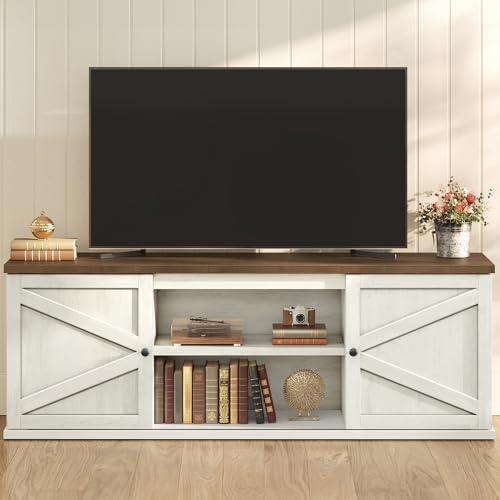
Full-width consoles for a 75-inch screen sit in the $150 to $400 range. The VASAGLE Farmhouse TV Stand rated for 80-inch TVs, with sliding barn doors, is about $159.99 and is typical of the 70- to 72-inch-wide farmhouse consoles that give a 75-inch screen a few inches of margin per side. Smaller consoles marketed for 65- to 75-inch sets, like the Sweetcrispy 63-inch TV Stand with fabric drawers at about $65.98, are only wide enough if the TV’s feet sit inward and you accept a slight overhang. Two alternatives solve width problems from another direction: the Rfiver Table Top TV Stand with height-adjustable legs for 37- to 90-inch TVs, about $29.98, replaces wide-set factory feet with a compact pedestal base, and the PERLESMITH Universal TV Stand Legs with mount for 37- to 78-inch TVs up to 99 pounds, about $49.99, do the same job for sets under that weight.
Our top picks
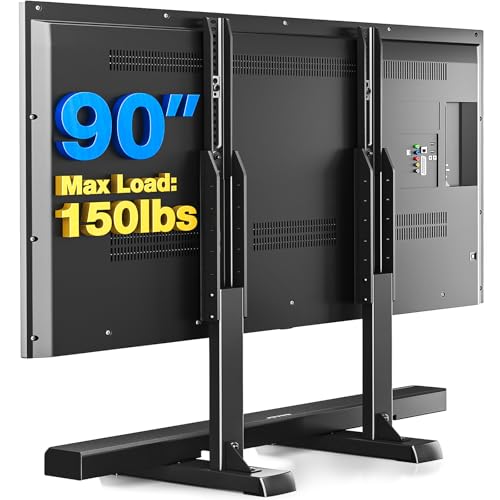

 PERLESMITH Universal TV Stand Legs for 37-78
- 【Universal Tv Stand Holds Most Tvs】Our tabletop tv…
- 【Swivels 60° To Find The Best Viewing Position】This…
- 【9 Height Adjustment Positions & Installation】PERLESMITH universal TV…
As an Amazon Associate we earn from qualifying purchases at no extra cost to you.
How to Measure Your Space
- Measure the TV’s overall width and height with the bezel; typical 75-inch sets run 65 to 67 inches wide and 37 to 39 inches tall. Then measure the outside spread of the feet, which ranges from about 45 inches on center-set feet to 60 inches or more on edge-set feet.
- Weigh the TV, or check the spec sheet. Most 75-inch sets weigh 65 to 100 pounds with their stand. The console top and any pedestal or leg kit must be rated above that figure with margin; a 120-pound rating is a comfortable minimum.
- Measure the wall segment where the stand will sit and subtract 4 to 6 inches per side to keep the stand off door casings and windows.
- Sit where you normally watch and measure floor to eye level, typically 40 to 44 inches on a sofa. Subtract 19 inches (half the screen height) to get your target stand height, which lands at 21 to 25 inches for most rooms.
- Measure viewing distance from the screen to the seat. For a 75-inch 4K screen, 9.5 to 13 feet is comfortable; if you sit under 8 feet away, lower the stand height by a couple of inches so the screen does not loom.
- Measure depth: TV foot depth (12 to 15 inches) plus 4 inches for cables and a soundbar. A stand shallower than 16 inches is a risk.
By Room or Use Case
Living room with a standard sofa
A 72- to 80-inch console at 22 to 24 inches tall is the target. Closed doors on the end cabinets hide gear and open center shelves keep a receiver cool. Expect $150 to $400 for engineered wood, $500 and up for solid wood.
Apartment where a 75-inch-wide console will not fit
Use a 55- to 65-inch cabinet and put the TV on a pedestal or leg kit that narrows the footprint to 20 to 36 inches. The screen will overhang the cabinet by several inches per side, which looks intentional with a floating-TV style. Confirm the pedestal is rated for your TV’s weight and VESA pattern, usually 400 by 400 millimeters on 75-inch sets.
Media room or basement
Go wide, 80 to 90 inches, and deep, 18 to 20 inches, so a full-size receiver and a game console sit side by side. Because the sofa is often farther back, 11 to 14 feet, a slightly taller stand of 26 to 28 inches still keeps the screen within a comfortable angle.
Bedroom viewed from bed
Eye level lying propped in bed is roughly 48 to 54 inches. A stand of 30 to 34 inches, or a mount-style stand adjusted so the screen center is near 50 inches, is more comfortable than the living-room height. Width can drop to 66 to 70 inches if there is no soundbar.
Open-plan great room
A low, long sideboard of 84 to 96 inches at 20 to 24 inches tall anchors a big wall and gives the 75-inch screen visual weight to sit against. Leave 10 to 15 inches of console on each side of the screen for speakers or plants.
Common Sizing Mistakes
- Buying a 65-inch-class stand for a 75-inch TV. The overhang is 3 inches or more per side and the feet often miss the top entirely.
- Ignoring the feet spread. Edge-set feet can be 60 inches apart, which requires a stand at least that wide regardless of overall TV width.
- Underestimating weight. Some 75-inch sets exceed 90 pounds; a thin particleboard top bows over time under that load.
- Setting the screen too high. A 30-inch console plus a 19-inch half-screen puts the center at 49 inches, well above sofa eye level.
- Too shallow for a soundbar. A 16-inch-deep stand with 14-inch-deep feet leaves no room for a bar in front; go to 18 inches or wall-mount the bar.
- Skipping anti-tip straps. Any 75-inch TV on a stand should be strapped to the wall or the console, especially with children in the house.
FAQ
What is the minimum TV stand width for a 75-inch TV?
About 70 inches (178 cm) for a clean look, or 66 inches if the TV has a center pedestal and you accept the edges flush with the stand. Anything under 66 inches leaves the screen overhanging.
How high should a 75-inch TV stand be?
For sofa viewing, 20 to 25 inches, which puts the center of the 38-inch-tall screen at roughly 40 to 44 inches. For bedroom viewing from a bed, 30 to 34 inches. The rule is that the screen center should sit at or slightly below seated eye level.
Can I put a 75-inch TV on a 65-inch stand?
Physically, if the feet fit on the top, but the screen will overhang by about 3 inches per side and the setup is easier to tip. If a 65-inch cabinet is what fits your room, add a universal pedestal or leg kit rated for the TV’s weight so the load sits on a compact base, and strap the TV to the wall.
How much does a 75-inch TV weigh, and does the stand rating matter?
Typically 65 to 100 pounds with the factory stand attached. Most furniture-grade consoles list a top rating of 100 to 200 pounds, and in 2026 pedestal and leg kits commonly state 88, 99, or 110 pounds; pick a rating that exceeds your TV’s weight by at least 20 percent.