Our Top Picks
The best microSD cards for dash cams and security cameras are high-endurance cards sized within your camera’s stated limit, with a minimum U1/Class 10 rating for 1080p and U3/V30 for demanding 4K recording.
Quick picks by recording situation
| Situation | Best card type or example | Recommended capacity | Why it fits |
|---|---|---|---|
| 1080p dash cam with loop recording | Samsung PRO Endurance, SanDisk High Endurance, or Kingston High-Endurance | 64GB–128GB | Reliable sustained writing without paying for unnecessary 4K speed |
| 4K dash cam | SanDisk MAX Endurance or a U3/V30 high-endurance card | 128GB–256GB, if supported | Higher write-speed margin and more space for large video files |
| Indoor security camera recording motion clips | Samsung PRO Endurance or Transcend High Endurance | 64GB–128GB | Motion recording produces fewer writes than nonstop recording |
| Outdoor camera recording continuously | SanDisk MAX Endurance or another high-endurance U3/V30 card | 128GB–256GB | Designed for heavier daily write cycles and longer retention |
| Camera with a 32GB maximum | 32GB high-endurance microSDHC card | 32GB | Matches the device’s file-system and capacity restriction |
What matters most when choosing a card
1. Endurance is more important than peak speed
Dash cams and security cameras repeatedly overwrite old files. This is a much harder workload than occasionally saving photographs. A high-endurance card uses flash memory and firmware intended to tolerate frequent writing, while an ordinary card may slow down, corrupt files, or fail sooner under continuous recording.

TIDEFORCIX 64GB Micro SD Card for Dashcam & Security Camera U3 V30 A1
Picked as a relevant option in this category.
View on Amazon
TIDEFORCIX 128GB Micro SD Card for Dashcam & Security Camera U3 V30 A1
Picked as a relevant option in this category.
View on Amazon
64GB Micro SD Card 2-Pack for Dash Cam&Security Camera, A1 U3 V30 Class 10
Chosen because it specifies A1 U3 V30 Class 10.
View on Amazon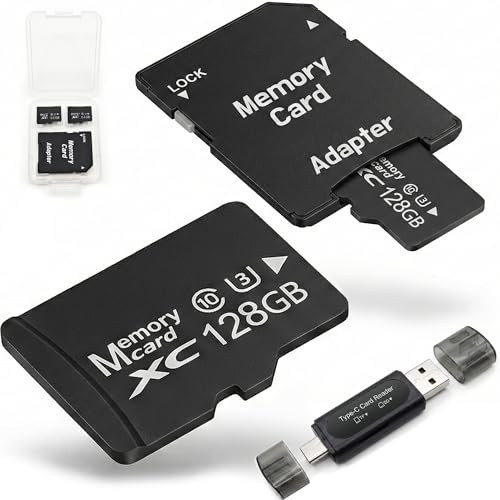
128GB Micro SD Card 2-Pack for Dash Cam&Security Camera, A1 U3 V30 Class 10
Chosen because it specifies A1 U3 V30 Class 10.
View on Amazon“Endurance” is not a single universal industry rating. Manufacturers may publish different service-life estimates based on capacity, recording conditions, video bitrate, and the amount of data written each day. Treat endurance branding as a useful category, but also check the camera manufacturer’s approved-card list.
Samsung PRO Endurance, SanDisk High Endurance, SanDisk MAX Endurance, Kingston High-Endurance, and Transcend High Endurance are established product families intended for surveillance or vehicle recording. Choose the highest endurance tier that fits your recording schedule and budget rather than selecting a standard gaming, phone, or photography card solely because its advertised read speed is high.
2. Match write speed to the camera
Class 10 is the practical minimum for most modern cameras. U1 cards guarantee at least 10MB/s of sequential write speed, while U3 cards guarantee at least 30MB/s. V30 is another video-speed classification indicating a sustained minimum of 30MB/s under the relevant standard.
For 1080p recording, a reputable U1 high-endurance card is commonly sufficient. For 2.7K and 4K, choose U3/V30 unless the camera manual specifies otherwise. A card advertised with a very high read speed does not automatically provide better continuous recording; read speed mainly affects transferring files to a computer.
3. Capacity changes retention time, not image quality
A larger card lets the camera retain more footage before loop recording overwrites the oldest files. It does not improve sharpness, night vision, or compression. The correct capacity is the largest one the camera can format and address reliably.
| Approximate video bitrate | 32GB usable recording | 64GB usable recording | 128GB usable recording | 256GB usable recording |
|---|---|---|---|---|
| 8Mbps | About 8 hours | About 16 hours | About 32 hours | About 64 hours |
| 15Mbps | About 4.5 hours | About 9 hours | About 19 hours | About 38 hours |
| 30Mbps | About 2 hours | About 4.5 hours | About 9.5 hours | About 19 hours |
| 60Mbps | About 1 hour | About 2 hours | About 4.5 hours | About 9.5 hours |
These figures use roughly 90% of the labeled capacity and exclude small variations caused by audio, file-system overhead, and the camera’s actual bitrate. A 4K dash cam recording at 60Mbps can fill a 128GB card in roughly four to five hours, while a 1080p security camera at 8Mbps may retain about a day and a half of continuous video.
Head-to-head: the main endurance card families
Samsung PRO Endurance
This is a strong all-around choice for 1080p dash cams and security cameras. It is available in common capacities and is usually offered in U1 or U3 variants depending on the model and size. Choose the U3 version when the camera records 4K or has a particularly high bitrate. Its main advantage is a clear surveillance-focused design without requiring the highest-capacity or highest-speed card.
SanDisk High Endurance
SanDisk High Endurance is suited to everyday dash cams and home cameras, especially at 32GB, 64GB, or 128GB capacities. It is a sensible match for 1080p and many 2.7K devices. Confirm the exact speed class on the package, because product specifications can differ between capacities and generations.
SanDisk MAX Endurance
MAX Endurance is the better SanDisk choice for heavier continuous recording, hot vehicle interiors, or cameras that write throughout the day. It typically costs more than the standard High Endurance line, but that premium can be worthwhile when replacing a failed card would mean losing incident footage or climbing to a camera mounted outdoors.
Kingston High-Endurance
Kingston’s high-endurance line is a practical option when the camera supports its capacity and speed class. It is appropriate for loop recording and surveillance workloads, but verify whether the particular card is U1 or U3 before using it in a 4K device.
Transcend High Endurance
Transcend High Endurance cards are designed for dash cams and security systems and can be a good fit for devices with conservative capacity limits. They are especially useful when a camera manual lists Transcend compatibility. Do not assume that every Transcend microSD card is endurance-rated; select the surveillance-specific family.
Choose by camera, not just by card label
- Check the maximum capacity: Some older cameras accept only 32GB microSDHC cards. Others support 128GB or 256GB microSDXC cards after a firmware update.
- Check the required format: 32GB cards commonly use FAT32, while larger cards generally use exFAT. Some cameras require their own in-device formatting process.
- Check the bitrate: Look in the camera specifications for Mbps, not only “1080p” or “4K.” Two cameras with the same resolution can write very different amounts of data.
- Check loop and event protection: Dash cams may lock collision clips so they are not overwritten. A full protected-file folder can stop recording even when free space appears available.
- Check temperature exposure: A card inside a parked car may face much more heat than an indoor camera. Use a higher-endurance model for this environment.
- Format regularly when instructed: Many camera makers recommend formatting the card in the device every few weeks or months. Back up important footage first.
Which capacity should you buy?
Choose 64GB for a basic 1080p dash cam used for commuting, provided the camera supports it. Choose 128GB when you want roughly twice the retention time or when a security camera records frequent motion events. Choose 256GB for high-bitrate 4K or continuous outdoor monitoring, but only when the manual explicitly supports 256GB. Buying a 512GB card for a camera rated to 128GB can cause recognition and recording problems rather than giving extra storage.
When to replace a microSD card
Replace the card if the camera reports write errors, recordings contain gaps, files cannot be opened, the camera repeatedly asks for formatting, or the device stops recording after operating normally. A card that has reached the end of its useful life may still appear readable on a computer, so occasional playback checks matter. For important security footage, use a second card as a ready replacement and copy incident files promptly instead of treating loop recording as permanent backup.
Bottom line
For most 1080p dash cams and indoor security cameras, a 64GB or 128GB U1/Class 10 high-endurance card is the balanced choice. For 4K or nonstop outdoor recording, step up to a U3/V30 high-endurance model such as SanDisk MAX Endurance or a comparable surveillance-rated card. Confirm the camera’s capacity, format, and bitrate before buying; those three details matter more than an impressive maximum read-speed number.