Key takeaways
- Desk type: Choose a desk converter if you already like your current table; a complete standing desk offers better height range, legroom, and long-term flexibility.
- Stability: Look for a broad base, rigid frame, and minimal side-to-side movement at standing height. Four-leg designs are especially appealing for large or equipment-heavy setups.
- Motor and controls: Smooth, reasonably quiet movement and programmable memory buttons make frequent position changes much less irritating.
- Desktop layout: A 48- to 55-inch surface generally suits a monitor, laptop, and accessories. Measure your room carefully, including clearance behind the desk.
- Useful extras: Drawers, USB charging, outlets, a keyboard tray, or a footrest can improve convenience, but only if they do not compromise the workspace you actually need.
What's inside
A motorized standing desk can make long workdays more comfortable, but choosing one is less straightforward than comparing desktop sizes. Buyers must balance motor noise, stability, height range, control quality, cable management, and the amount of room available—especially when a desk needs to work equally well for sitting, standing, and everyday storage.
This guide focuses on practical home use rather than showroom appeal. The recommendations cover compact desk converters, full-size electric desks, glass-top designs, larger workstations, and a stable option for heavier equipment, with attention to assembly, movement, workspace comfort, and the details that matter after the first week.
As an Amazon Associate we earn from qualifying purchases.


How to Choose a Motorized Standing Desk (2026)
- Desk type: Choose a desk converter if you already like your current table; a complete standing desk offers better height range, legroom, and long-term flexibility.
- Stability: Look for a broad base, rigid frame, and minimal side-to-side movement at standing height. Four-leg designs are especially appealing for large or equipment-heavy setups.
- Motor and controls: Smooth, reasonably quiet movement and programmable memory buttons make frequent position changes much less irritating.
- Desktop layout: A 48- to 55-inch surface generally suits a monitor, laptop, and accessories. Measure your room carefully, including clearance behind the desk.
- Useful extras: Drawers, USB charging, outlets, a keyboard tray, or a footrest can improve convenience, but only if they do not compromise the workspace you actually need.
The Best Motorized Standing Desk (2026)s Reviewed
FLEXISPOT 42-Inch Electric Desk Converter
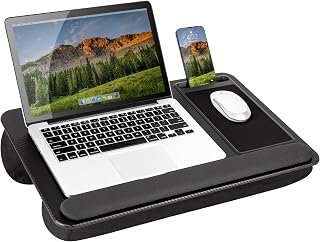
The FLEXISPOT 42 inch Electric Motor Desk Converter is a sensible upgrade for a home office that already has a sturdy table. Its motorized lift removes the effort from changing positions, while the quick-release keyboard tray helps create a more natural typing setup. It is best for one-monitor or laptop-focused work rather than a sprawling dual-screen arrangement, but its smaller footprint is a genuine advantage in bedrooms and compact offices.
FLEXISPOT Comhar 48-Inch Glass Standing Desk
The FLEXISPOT Comhar 48″ Electric Glass Standing Desk is aimed at buyers who want a desk to look like part of the room rather than office equipment. The tempered-glass top, drawers, and USB charging add polish and everyday convenience, while the 48-inch width remains manageable in a typical home office. Glass shows fingerprints and can feel less forgiving than wood, so it suits tidy, design-conscious setups more than rough workshop use.
SANODESK Four-Leg 55-Inch Desk
The SANODESK 4-Leg 55”x28” Large Electric Height Adjustable Standing Desk gives you the most reassuring foundation of this group. Its generous surface is well suited to multiple monitors, speakers, and paperwork, and the four-leg structure should appeal to anyone who dislikes a desk that feels lively at full height. It takes more floor space than a converter or 48-inch model, but that extra room pays off for serious work-from-home setups.
COLAMY 55-Inch Dual-Motor Standing Desk
The COLAMY Electric Standing Desk 55×28 Inch is a practical workstation for users who want more than a bare tabletop. Dual motors, drawers, outlets, and a footrest make it particularly attractive for long sessions, while the walnut-and-white finish gives it a warmer appearance than many minimalist frames. It is a strong choice for a mixed office and gaming room, although buyers should plan their cable routing before assembly so the built-in features do not create a tangle underneath.
ErGear 48-Inch Electric Standing Desk
The ErGear 48 X 24 Inch Height Adjustable Electric Standing Desk is a compact full desk with the controls most people actually use: one-touch adjustment and four memory presets. Its 48-inch width fits a monitor and laptop comfortably without overwhelming a smaller room, and the steel frame and stated 176-pound capacity provide useful reassurance for a conventional home-office load. It is an especially balanced pick when easy assembly and straightforward operation matter more than drawers or decorative extras.
Frequently Asked Questions
Are motorized standing desks worth it?
They can be, particularly if you already spend several hours at a computer. Motorized adjustment makes it easy to alternate between sitting and standing instead of leaving the desk fixed in the position used most often.
How often should I change positions?
There is no single ideal schedule, but changing position every 30 to 60 minutes is a practical starting point. Stand for shorter periods at first, keep your monitor at a comfortable height, and avoid treating standing as a replacement for all seated work.
Are standing desks noisy?
Most electric models produce a brief mechanical hum while moving. Noise varies with the motor, frame, load, and floor, so a smooth control system and a level surface are more useful indicators than a marketing claim alone.
Can I use a heavy monitor setup?
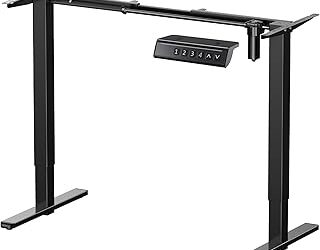
Yes, provided the desk’s stated capacity covers the desktop equipment and any accessories. For unusually heavy tops or large multi-monitor arrangements, a frame such as the VIVO Premium Electric 4-Leg Dual Motor Standing Desk Frame may be more appropriate than a complete compact desk.
Final Thoughts
The ErGear is the most broadly practical choice for a smaller home office, while the SANODESK suits users who want a spacious, especially stable workstation. For a more design-led room, the FLEXISPOT Comhar adds useful storage and charging without looking overly utilitarian.