Our Top Picks
The best Lexar SD cards for cameras and video are the Professional 2000x for high-bitrate 4K and 6K/8K workflows, the Professional 1800x or 1667x for demanding 4K cameras, and the 1066x Silver for most everyday 4K and photography use.
Quick picks by camera and recording format
| Best for | Lexar card line | Advertised maximum speed | Video rating | Interface |
|---|---|---|---|---|
| High-bitrate 4K, 6K, 8K and burst photography | Professional 2000x SDXC | Up to 300 MB/s read, 260 MB/s write | V90 | UHS-II |
| Professional 4K and fast continuous shooting | Professional 1800x SDXC | Up to 270 MB/s read, 180 MB/s write | V60 | UHS-II |
| 4K video and enthusiast mirrorless cameras | Professional 1667x SDXC | Up to 250 MB/s read, 120 MB/s write | V60 | UHS-II |
| Everyday 4K, Full HD and general photography | Professional 1066x Silver SDXC | Up to 160 MB/s read, 120 MB/s write | V30 | UHS-I |
Maximum figures are laboratory interface speeds, not guaranteed performance in every camera. For recording reliability, the Video Speed Class is more useful: V30 guarantees at least 30 MB/s sustained write speed, V60 at least 60 MB/s, and V90 at least 90 MB/s. One megabyte per second equals eight megabits per second, so V30 supports a minimum of 240 Mbps on paper.

Lexar 256GB Silver SD Memory Card, 225MB/s Read, 4K, V30, U3, UHS-I
Chosen because it specifies 225MB/s Read and V30.
View on Amazon
Lexar 128GB 2-Pack Silver PRO SD Card, 280MB/s Read, 4K, V60, U3, UHS-II
Chosen because it specifies 280MB/s Read and V60.
View on Amazon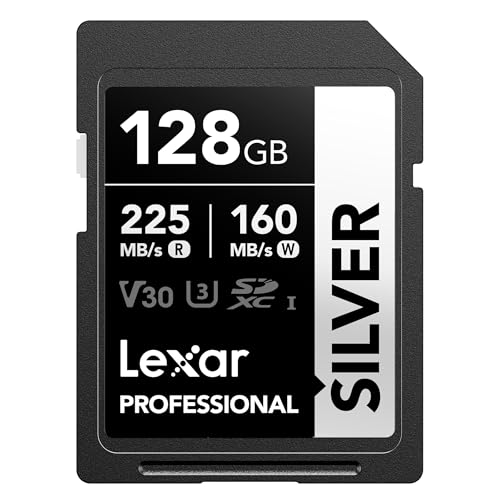
Lexar 128GB Silver SD Memory Card, 225MB/s Read, 4K, V30, U3, UHS-I
Chosen because it specifies 225MB/s Read and V30.
View on Amazon
Lexar 128GB Silver PRO SD Memory Card, 280MB/s Read, 4K, V60, U3, UHS-II
Chosen because it specifies 280MB/s Read and V60.
View on AmazonLexar Professional 2000x: the choice for the most demanding formats
The Professional 2000x is the strongest option in this group when a camera requires a V90 card. Its UHS-II interface and V90 rating make it suitable for high-bitrate 4K, some 6K and 8K recording modes, RAW video where supported, and long bursts from high-resolution cameras.
Choose it when your camera manual specifically calls for V90 or when you need the greatest margin for sustained writing. It is also a sensible choice for photographers who regularly shoot hundreds of RAW images in a burst and want the camera buffer to clear quickly.
The trade-off is cost. V90 cards are usually much more expensive than V30 models, and a UHS-II reader is needed to approach the card’s advertised transfer speeds. In a UHS-I camera, the card may still function, but the extra interface capability will not be fully used.
Best capacities
- 64GB: practical for short shoots and still photography, but easy to fill with high-bitrate video.
- 128GB: the sensible starting point for regular video work.
- 256GB: better for full-day production, provided the camera supports the capacity and SDXC format.
Professional 1800x versus 1667x: the better-value UHS-II options
The Professional 1800x and 1667x are aimed at cameras that need more than basic UHS-I performance but do not require V90. Both are UHS-II cards with V60 ratings, meaning their minimum sustained write class is 60 MB/s. That makes them appropriate for many 4K recording modes and fast RAW bursts.
The 1800x has the higher advertised read and write ceilings, so it is the preferable choice when the price difference is modest or when you frequently copy large folders to a computer. The 1667x is a strong value option for a camera that records within the V60 requirement and does not benefit from the 1800x’s faster maximum transfer rate.
Neither card should be selected solely because its name contains a large number. Check the camera’s required V-class rating, because a V60 card is not a substitute for a V90 card in a camera that explicitly requires V90.
Professional 1066x Silver: the everyday camera pick
The Professional 1066x Silver is the most practical choice for many mirrorless cameras, DSLRs, compact cameras and camcorders. Its V30 rating supports ordinary 4K recording at moderate bitrates and is generally more than enough for Full HD.
It is especially suitable when your camera records 4K at 100–200 Mbps, uses H.264 or H.265 rather than a very high-bitrate intraframe codec, or limits burst speed before the card becomes the main bottleneck. It also offers a better cost-per-gigabyte ratio than V60 and V90 cards.
Do not confuse fast file transfer with recording capability. A card can advertise a high read speed while having a lower sustained write speed. For video, the V30 marking is the key qualification; the camera’s own recording bitrate still needs to be below that limit with some headroom.
Capacity: how much recording time do you need?
Capacity depends on codec, frame rate, color depth and bitrate. As a planning estimate, a 128GB card provides approximately the following usable recording times before formatting overhead and file-management space:
| Recording bitrate | Approximate 128GB recording time | Approximate 256GB recording time |
|---|---|---|
| 100 Mbps | 2 hours 50 minutes | 5 hours 40 minutes |
| 200 Mbps | 1 hour 25 minutes | 2 hours 50 minutes |
| 400 Mbps | 42 minutes | 1 hour 25 minutes |
| 800 Mbps | 21 minutes | 42 minutes |
These figures use the decimal capacity commonly printed on memory cards and are estimates rather than camera-specific guarantees. For paid or irreplaceable work, two smaller cards can be safer than one very large card: a card failure then affects less footage. However, changing cards during an event can be inconvenient, and some cameras record to two slots only in particular modes.
Decision matrix: match the card to your situation
| Your situation | Recommended choice | Why |
|---|---|---|
| Camera requires V90 | Professional 2000x | Meets the highest sustained video class in this comparison. |
| 4K camera requires V60 | Professional 1800x or 1667x | Provides the required 60 MB/s minimum sustained write class. |
| Everyday 4K at up to about 200 Mbps | Professional 1066x Silver | V30 gives suitable minimum write performance at a lower cost. |
| Large RAW bursts and fast computer transfers | Professional 2000x or 1800x | UHS-II and higher advertised write speeds can reduce offload and buffer delays. |
| Older camera with a UHS-I slot | Professional 1066x Silver, unless the manual specifies more | UHS-II cards may work, but the camera cannot use their full interface speed. |
| Long trips with limited access to storage | Two or more 128GB or 256GB cards | Creates capacity redundancy instead of relying on one card. |
Compatibility checks before buying
1. Read the camera manual
Look for three details: the required speed class, the maximum supported capacity, and whether the camera accepts SDHC or SDXC. SDHC cards normally cover capacities from 4GB to 32GB, while SDXC cards start at 64GB. A camera that does not support SDXC may not recognize a 64GB or larger card.
2. Check UHS-I or UHS-II
UHS-II cards have an additional row of contacts. They are backward-compatible with many UHS-I devices, but the camera may operate at UHS-I speed. For maximum transfer performance, use a UHS-II reader and a computer connection fast enough to handle the data.
3. Match sustained write speed to bitrate
A 400 Mbps video mode writes about 50 MB/s, so V60 provides useful headroom while V30 may be marginal despite the nominal conversion. High-frame-rate, All-Intra, RAW and 10-bit modes can have much higher bitrates than a camera’s standard 4K setting.
Practical buying advice
Format the card in the camera before important recording, keep firmware current, and avoid filling a card completely. Download footage to at least two locations before reusing it. If a camera stops recording, drops frames or refuses a high-bitrate mode, try the speed class recommended by the manufacturer rather than relying on the card’s advertised read speed.
For most shoppers, the Professional 1066x Silver is the best Lexar SD card for standard 4K and photography. Step up to the Professional 1800x or 1667x when the camera specifies V60, and choose the Professional 2000x when V90, high-bitrate video or intensive burst shooting makes sustained performance the priority.
Frequently asked questions
Is a Lexar 2000x card faster in every camera?
No. Its full performance requires a compatible UHS-II camera and reader. In a UHS-I device, it may function but will be limited by the camera’s interface.
Is V30 enough for 4K?
Often, but not always. Compare the camera’s exact 4K bitrate with the card’s sustained video class. High-frame-rate, All-Intra, 10-bit and RAW modes may require V60 or V90.
Should photographers buy 128GB or 256GB?
Choose 128GB for ordinary day trips and easier risk separation between cards. Choose 256GB for long video sessions, high-bitrate formats or travel where changing cards frequently is impractical.