Key takeaways
- Stability: Look for a rigid four-leg frame, solid cross-support, and feet that sit evenly on the floor. Stability matters most when typing, gaming, or using monitor arms at full height.
- Weight capacity: Add the weight of your desktop, monitors, computer, speakers, and accessories before choosing. A generous rating provides useful headroom, but capacity alone does not guarantee a wobble-free desk.
- Height range: Check both the lowest and highest settings against your chair, stature, and preferred standing posture. The best range lets you keep elbows near 90 degrees without raising your shoulders.
- Controls and noise: Memory presets make frequent adjustments easier, while quieter motors are less distracting in bedrooms and shared workspaces. Anti-collision protection is another worthwhile convenience.
- Desktop and assembly: Confirm the desktop dimensions, board construction, cable-routing options, and frame compatibility. A large surface is helpful, but a heavy top and careful leveling can affect the final result.
What's inside
Choosing a four-leg standing desk is less straightforward than it sounds. A wider base can improve stability, but the frame still needs to handle monitor arms, speakers, a desktop PC, and the repeated movement of changing height without wobbling or sounding harsh. Some desks also sacrifice usable legroom or make assembly unnecessarily difficult.
This guide focuses on the details that matter in everyday home use: steadiness at standing height, lifting capacity, motor performance, workspace, controls, and practical assembly. The selections below cover complete desks as well as frames for buyers who already have a desktop they like.
As an Amazon Associate we earn from qualifying purchases.


How to Choose a 4 Leg Standing Desk (2026)
- Stability: Look for a rigid four-leg frame, solid cross-support, and feet that sit evenly on the floor. Stability matters most when typing, gaming, or using monitor arms at full height.
- Weight capacity: Add the weight of your desktop, monitors, computer, speakers, and accessories before choosing. A generous rating provides useful headroom, but capacity alone does not guarantee a wobble-free desk.
- Height range: Check both the lowest and highest settings against your chair, stature, and preferred standing posture. The best range lets you keep elbows near 90 degrees without raising your shoulders.
- Controls and noise: Memory presets make frequent adjustments easier, while quieter motors are less distracting in bedrooms and shared workspaces. Anti-collision protection is another worthwhile convenience.
- Desktop and assembly: Confirm the desktop dimensions, board construction, cable-routing options, and frame compatibility. A large surface is helpful, but a heavy top and careful leveling can affect the final result.
The Best 4 Leg Standing Desks (2026) Reviewed
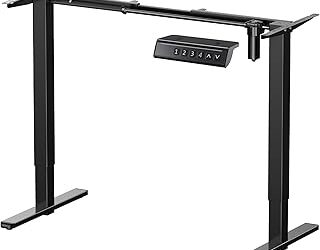
4-Leg Electric Standing Desk Frame
This dual-motor frame is a strong choice for buyers building a custom workstation around an existing desktop. Its 264-pound capacity gives it plenty of room for multiple monitors and a gaming PC, while the four-leg structure should feel more planted than many two-leg alternatives. Measure your top carefully before ordering, and plan for a little extra time during assembly and leveling.
X-Win 71-Inch Electric Standing Desk
The X-Win is aimed at users who want a broad gaming or home-office surface without giving up the reassurance of four-leg support. Its 71-inch width accommodates a multi-monitor arrangement comfortably, leaving space for speakers and everyday accessories. It is particularly appealing when desk stability is a higher priority than keeping the footprint compact.
FLEXISPOT 4-Leg Standing Desk
FLEXISPOT’s 55-by-28-inch desk strikes a practical balance between workspace and room-friendly dimensions. The black finish is easy to pair with office furniture, and the memory LED controller is useful when switching between sitting and standing several times a day. It is a sensible all-rounder for a conventional home office rather than an oversized gaming setup.
4 Leg Standing Desk Large, 55-by-28-Inch
This electric desk is built around a familiar 55-by-28-inch computer-workstation format, making it an approachable option for a first sit-stand setup. The splice-board desktop design may appeal to shoppers watching their budget, while the four-leg base is intended to keep the surface steady during adjustment. Inspect the desktop joins during setup and take care to level every foot.
JWX 4-Leg Electric Standing Desk Frame
With a stated 330-pound capacity, the JWX frame is the heavy-duty pick in this group. It suits substantial custom desktops, several monitors, or equipment-heavy workstations where a lower-capacity frame could feel limiting. As with any high-capacity frame, the quality and weight of your desktop, plus accurate installation, will have a major effect on real-world performance.
Frequently Asked Questions
Are four-leg standing desks more stable?
They can be, especially with a rigid frame and well-leveled feet. Extra legs distribute the load and may reduce side-to-side movement, but construction quality, desktop weight, and maximum height still matter.
Do four-leg desks take longer to assemble?
Usually, yes. There are more legs, brackets, and adjustment points to align. Assembly is manageable for most buyers, but having a second person available makes it easier to support the frame and position a large desktop.
Is a 55-by-28-inch desktop large enough for two monitors?
For many home offices, yes. Two standard monitors, a keyboard, and a mouse fit comfortably, particularly with monitor arms. A 71-inch surface is better if you also need large speakers, a desktop tower on top, or generous writing space.
Should I buy a complete desk or a frame only?
Choose a complete desk for simpler shopping and a coordinated appearance. A frame-only model is preferable when you already own a suitable top or want to select a particular size, material, or finish. Always verify the frame’s supported desktop dimensions.
Final Thoughts
The FLEXISPOT 4-Leg Standing Desk is the best balanced choice for most home offices, while the X-Win suits users who need a generous gaming surface. For demanding custom workstations, the JWX frame stands out for its higher stated capacity; the right pick ultimately depends on your equipment, available floor space, and whether you need a complete desk or a reusable frame.