Key takeaways
- Clamp compatibility: Measure your desk edge thickness before buying any clamp-on accessory. Most power strips and organizers in this guide fit edges between 0.4 and 2.2 inches, but a quick check prevents a frustrating return.
- Power capacity: If you run dual monitors, a laptop charger, and a few USB devices simultaneously, look for surge protectors rated at 70W or higher with at least six AC outlets. Skimping here means hunting for wall sockets.
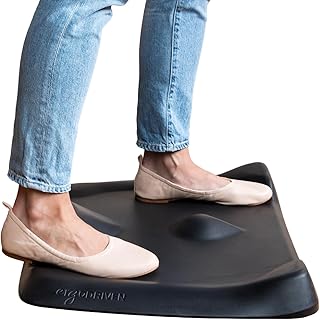
- Foot fatigue: Standing for hours on a hard floor is no joke. An anti-fatigue mat with purposeful terrain — not just a flat foam slab — encourages subtle foot movement that keeps blood flowing and reduces joint strain.
- Vertical storage: A standing desk shrinks your horizontal workspace. Under-desk shelves and pegboard-style organizers let you reclaim that space without adding visual clutter to your line of sight.
- Riser vs. full desk: If you already own a desk you love, a sit-to-stand converter is far cheaper and easier than replacing the whole thing. Prioritize models that hold dual monitors without wobble.
What's inside
Switching to a standing desk is one of the best moves you can make for your back and energy levels, but the desk itself is only half the equation. Most people discover pretty quickly that bare-bones setups lead to cable chaos, sore feet, and a cluttered work surface that kills the whole point of standing up in the first place.
The good news: a handful of well-chosen accessories can transform a wobbly, disorganized standing desk into something that genuinely feels good to use all day. We tested desk risers, power solutions, under-desk organizers, and anti-fatigue mats to put together this shortlist of the best standing desk accessories worth your money in 2026.
As an Amazon Associate we earn from qualifying purchases.



How to Choose Standing Desk Accessories (2026)
- Clamp compatibility: Measure your desk edge thickness before buying any clamp-on accessory. Most power strips and organizers in this guide fit edges between 0.4 and 2.2 inches, but a quick check prevents a frustrating return.
- Power capacity: If you run dual monitors, a laptop charger, and a few USB devices simultaneously, look for surge protectors rated at 70W or higher with at least six AC outlets. Skimping here means hunting for wall sockets.
- Foot fatigue: Standing for hours on a hard floor is no joke. An anti-fatigue mat with purposeful terrain — not just a flat foam slab — encourages subtle foot movement that keeps blood flowing and reduces joint strain.
- Vertical storage: A standing desk shrinks your horizontal workspace. Under-desk shelves and pegboard-style organizers let you reclaim that space without adding visual clutter to your line of sight.
- Riser vs. full desk: If you already own a desk you love, a sit-to-stand converter is far cheaper and easier than replacing the whole thing. Prioritize models that hold dual monitors without wobble.
The Best Standing Desk Accessories (2026) Reviewed
FITUEYES 32-Inch Standing Desk Converter
The 32-inch FITUEYES converter is the sweet spot for home-office users who need room for a monitor and a laptop without the footprint swallowing the entire desk. Its gas-spring lift mechanism stays smooth after months of daily up-and-down transitions, and assembly takes under ten minutes with zero tools.
Anker Nano 70W Desk Clamp Power Strip
This is the cleanest power solution we have found for standing desks. The Anker Nano clamps unobtrusively to the desk edge, delivers 70W of total output across two USB-C ports and six AC outlets, and its compact profile does not interfere with legroom — a problem bulkier strips cause constantly.
Under-Desk Clamp-On Storage Shelf
If your standing desk surface keeps disappearing under notebooks and adapters, this clamp-on side shelf fixes that fast. The included pegboard panel is a surprisingly useful touch for hanging headphones, cables, or small tools, and the no-drill clamp design means zero damage to your desk finish.
CCCEI 15-Outlet Standing Desk Power Strip
Power hogs, this one’s for you. The CCCEI strips fifteen widely spaced outlets into a single edge-mounted bar with dedicated fast-charging USB-A and USB-C ports, making it the best choice if you have multiple monitors, a desktop PC, and peripherals that all need juice at once. The 6-foot flat plug is a thoughtful detail that keeps the whole setup behind the desk.
Ergodriven Topo Mini Anti-Fatigue Mat
The Topo Mini is smaller than the original Topo, which actually makes it the better pick for most standing-desk users — it fits under a converter without hanging off the edges. The calculated terrain gives your feet natural variation to shift across, and the premium foam retains its cushion for years instead of going flat after a few months like cheaper alternatives.
Frequently Asked Questions
Do I really need an anti-fatigue mat for my standing desk?
Yes, especially if you stand for more than two hours a day. A quality mat reduces pressure on your joints and encourages small movements that prevent stiffness. Skipping the mat is the fastest way to develop foot and lower-back pain and abandon standing altogether.
Can I use a desk converter on a glass-top desk?
Most clamp-on converters and accessories require a solid edge at least a few millimeters thick for a secure grip. Glass desks are generally not compatible. If you have a glass surface, a freestanding riser with a wide base is a safer option that avoids clamping entirely.
How many outlets do I actually need on my desk power strip?
Count your devices: a typical setup with dual monitors, a laptop charger, a desk lamp, and a phone charger uses five to six outlets. A strip with ten or more gives you room to add a speaker, webcam, or air purifier without scrambling for adapters.
Is a 32-inch or 36-inch desk converter better?
It depends on your desk depth. A 32-inch converter fits comfortably on most standard desks and leaves room for a keyboard tray or notepad in front. Go 36-inch only if you run dual full-size monitors and have at least 24 inches of desk depth to spare.
Final Thoughts
If you are building out a standing desk setup from scratch, start with the Ergodriven Topo Mini mat to protect your feet, add the Anker Nano power strip to tame your cables, and pair either the 32-inch or 36-inch FITUEYES converter with your existing desk. These three picks cover the core pain points — fatigue, power, and desk height — that trip up most first-time standing desk users.