Key takeaways
- Lumbar support: Look for a support section that can move or adjust rather than a fixed curve that may sit too high or low for your back.
- Seat comfort: A cushion should support your weight without immediately compressing flat. A waterfall-style front edge can also reduce pressure behind the knees.
- Adjustability: At minimum, prioritize seat height, tilt, and armrest positioning. A headrest and reclining function are useful extras, but only if they fit your posture.
- Desk compatibility: Check the chair’s height range and armrest design against your desk. Flip-up arms are especially helpful when you need to tuck the chair away.
- Build and fit: Pay attention to the stated weight capacity, seat width, base construction, and wheel quality. A chair that is too narrow or shallow will not feel ergonomic for long.
What's inside
Finding a comfortable desk chair under $200 can be surprisingly difficult. Many budget models look supportive in product photos but deliver a flat seat, weak lumbar adjustment, or armrests that get in the way once you sit for several hours. The right choice depends less on the number of features listed and more on whether those features suit your body, desk, and daily routine.
This guide focuses on practical home-office comfort: adjustability, breathable materials, seat support, stability, and useful long-session features. We’ve highlighted what each chair is best suited for, while keeping expectations realistic about what a sub-$200 chair can deliver.
As an Amazon Associate we earn from qualifying purchases.


How to Choose an Ergonomic Office Chair Under $200 (2026)
- Lumbar support: Look for a support section that can move or adjust rather than a fixed curve that may sit too high or low for your back.
- Seat comfort: A cushion should support your weight without immediately compressing flat. A waterfall-style front edge can also reduce pressure behind the knees.
- Adjustability: At minimum, prioritize seat height, tilt, and armrest positioning. A headrest and reclining function are useful extras, but only if they fit your posture.
- Desk compatibility: Check the chair’s height range and armrest design against your desk. Flip-up arms are especially helpful when you need to tuck the chair away.
- Build and fit: Pay attention to the stated weight capacity, seat width, base construction, and wheel quality. A chair that is too narrow or shallow will not feel ergonomic for long.
The Best Ergonomic Office Chair Under $200 (2026)s Reviewed
Best Overall: 330-Lb High-Back Mesh Office Chair
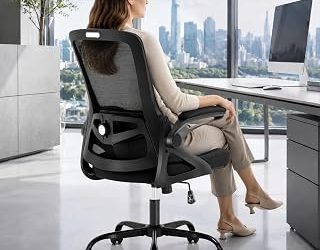
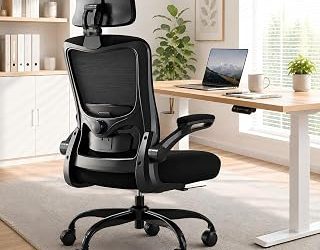
This high-back mesh chair is a practical all-rounder for home offices, combining a generous 330-pound capacity with adjustable lumbar support and flip-up armrests. The breathable back is useful in warmer rooms, while the arms can move out of the way when you want to sit closer to the desk or slide the chair under it.
Best Cushioned Option: Fizzin Mesh Office Chair
The Fizzin stands out for buyers who prefer a softer sitting experience than a fully mesh seat typically provides. Its thickened cushion, headrest, and adjustable lumbar support make it a sensible choice for mixed work and study use, although its extra padding may feel warmer than a minimalist mesh design.
Best for Long Work Sessions: Adjustable Padded Lumbar Chair
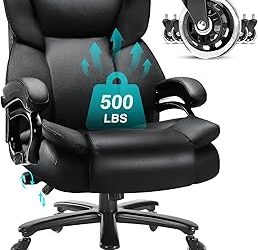
This ergonomic office chair focuses on lower-back comfort with padded lumbar support and a broad, cushioned seat. The 330-pound capacity gives it a reassuringly sturdy specification, making it worth considering for users who find narrow task chairs restrictive or uncomfortable.
Best Feature Set: Marsail Chair with 2D Headrest
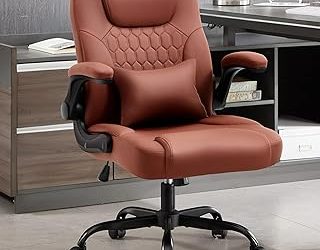
Marsail’s model offers a well-rounded adjustment package: lumbar support, a 2D headrest, adjustable arms, seat-height control, reclining, and smooth-rolling wheels. Its contoured cushion and breathable construction make it a strong pick for people who want an office chair that can shift between upright typing and relaxed reading.
Best for Armrest Adjustability: Marsail High-Back Mesh Chair
This second Marsail option emphasizes a high-back mesh design, adjustable lumbar support, a headrest, and 3D armrests. The extra armrest movement can make a meaningful difference if you alternate between keyboard work, writing, and video calls, while the mesh back helps limit heat buildup.
Frequently Asked Questions
Is an ergonomic office chair under $200 worth buying?
Yes, provided you prioritize fit and adjustability over luxury materials. At this price, you can usually find useful lumbar support, height adjustment, tilt control, and a breathable back, but long-term durability and fine-tuning may not match higher-priced commercial chairs.
Is mesh or padded upholstery better for home-office comfort?
Mesh tends to stay cooler and offers a firmer, more upright feel. Padded seats are often more comfortable immediately, especially for longer sessions, but can retain more heat and may lose firmness over time.
What chair features matter most for back support?
Start with correct seat height and a lumbar section that meets your lower back without forcing you forward. A supportive seat, a stable recline mechanism, and the ability to keep your feet flat usually matter more than a headrest or decorative extras.
How should an office chair fit my desk?
Your elbows should rest near a right angle while your shoulders remain relaxed, and your feet should sit flat on the floor. If the armrests prevent you from getting close to the desk, flip-up or height-adjustable arms can solve the problem.
Final Thoughts
For a balanced combination of capacity, airflow, and practical positioning, the 330-Lb High-Back Mesh Office Chair is a sensible starting point. Choose the Fizzin if you prefer a thicker cushion, or the Marsail chair with the 2D headrest if you want the broadest set of comfort adjustments for everyday home-office use.