Key takeaways
- Lumbar adjustment: Look for support that can be moved or adjusted to sit in the natural curve of your lower back, rather than a fixed pad that may feel too high or too low.
- Seat comfort: A contoured cushion with enough width and usable depth helps distribute pressure during long sessions. Excessively soft padding may feel pleasant initially but can lose support over time.
- Armrest positioning: Adjustable or flip-up armrests are useful for aligning your elbows with the desk and clearing space when you need to move closer to the work surface.
- Recline and tilt: A controlled rocking or reclining function lets you change posture instead of remaining rigidly upright all day. Make sure the mechanism feels stable and easy to lock or release.
- Fit and movement: Check the chair’s dimensions, height range, weight capacity, headrest position, and wheel quality. The best ergonomic chair is one that suits your body and your desk, not simply the one with the longest feature list.
What's inside
Finding a genuinely comfortable office chair is harder than comparing a few attractive photos. A chair can look impressively padded yet leave your lower back unsupported, force your shoulders upward, or become uncomfortable after an hour at the desk. Lumbar support matters, but so do seat depth, armrest position, recline control, and how well the chair fits your working posture.
This guide focuses on practical home-office comfort rather than flashy specifications alone. We look at adjustability, breathable materials, support for longer sessions, everyday usability, and the features most likely to make a noticeable difference when working, studying, gaming, or handling household tasks.
As an Amazon Associate we earn from qualifying purchases.


How to Choose an Ergonomic Office Chair With Lumbar Support (2026)
- Lumbar adjustment: Look for support that can be moved or adjusted to sit in the natural curve of your lower back, rather than a fixed pad that may feel too high or too low.
- Seat comfort: A contoured cushion with enough width and usable depth helps distribute pressure during long sessions. Excessively soft padding may feel pleasant initially but can lose support over time.
- Armrest positioning: Adjustable or flip-up armrests are useful for aligning your elbows with the desk and clearing space when you need to move closer to the work surface.
- Recline and tilt: A controlled rocking or reclining function lets you change posture instead of remaining rigidly upright all day. Make sure the mechanism feels stable and easy to lock or release.
- Fit and movement: Check the chair’s dimensions, height range, weight capacity, headrest position, and wheel quality. The best ergonomic chair is one that suits your body and your desk, not simply the one with the longest feature list.
The Best Ergonomic Office Chair With Lumbar Support (2026)s Reviewed
Fizzin Ergonomic Office Chair
The Fizzin combines a breathable mesh back with adjustable lumbar support, a thickened seat cushion, and a headrest. It is a practical choice for a home office that also serves as a gaming or study space, particularly if you want a more cushioned feel than a minimalist mesh chair typically provides.
Marsail Ergonomic Office Chair
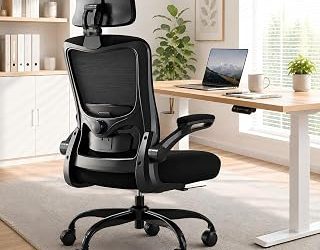
The Marsail stands out for its broad range of comfort adjustments, including lumbar support, a 2D headrest, adjustable armrests, height control, and reclining functionality. Its contoured seat and breathable design make it a strong all-rounder for users who regularly switch between focused work and relaxed reading.
Ergonomic Mesh Office Chair With 3D Armrests
This wide-seat task chair is aimed at buyers who want generous seating space and more flexible arm positioning. The adjustable lumbar support, 3D armrests, tilt function, and mesh construction give it a useful balance of posture control and day-to-day comfort for both home and company workstations.
Marrap Ergonomic Office Chair
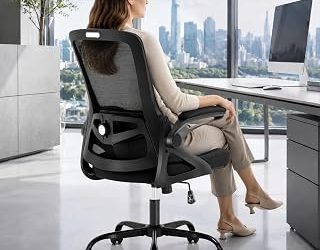
The marrap chair offers a mesh back, adjustable lumbar support, 3D armrests, and a headrest in a straightforward black design. Its 90–120-degree rocking range is especially useful if you prefer to ease tension by changing position throughout the day rather than sitting in one fixed angle.
HON Ignition 2.0 Ergonomic Office Chair
The HON Ignition 2.0 is a sensible workstation-focused option with lumbar support and adjustable arms. Its appeal is less about gaming-style extras and more about creating a composed, professional seating setup for concentrated computer work, making it a strong fit for a dedicated office.
Frequently Asked Questions
Is adjustable lumbar support worth prioritizing?
Yes, especially if more than one person uses the chair or you work for several hours at a time. Adjustable support makes it easier to place pressure where your lower back actually needs it instead of adapting your posture to a fixed cushion.
Is a mesh office chair better than a padded chair?
Neither material is automatically better. Mesh usually promotes airflow and can feel cooler, while a padded seat may provide a softer initial feel. Your preferred firmness, room temperature, and working habits should guide the decision.
Should an ergonomic chair have a headrest?
A headrest is helpful when you recline, read, or take breaks, but it is not essential for maintaining a good typing posture. If included, it should support the back of your head comfortably without pushing it forward while you work.
How should I set up a lumbar-support chair?
Adjust the seat so your feet rest flat, keep your knees roughly level with or slightly below your hips, and position the lumbar support in the small of your back. Set the armrests so your shoulders remain relaxed and keep the screen near eye level.
Final Thoughts
The Marsail is a compelling all-purpose pick for buyers who value extensive adjustment, while the HON Ignition 2.0 suits a more traditional productivity-focused workspace. For a softer, more versatile home setup, the Fizzin offers a useful combination of mesh breathability, cushioning, lumbar adjustment, and head support.