Key takeaways
- Height range: Check the lowest and highest settings against your seated chair height and preferred standing posture. A good fit should let your elbows rest near a right angle without shrugging your shoulders.
- Storage layout: Drawers are useful only when they match your routine. Look for a combination of shallow storage for stationery, deeper drawers for accessories, and open space for items you reach for often.
- Desktop depth: A 24-inch surface works for many laptop setups, while a 30-inch desktop gives a monitor, keyboard, and paperwork more breathing room. Measure your room before choosing a wider or corner model.
- Stability and movement: Pay attention to the frame, lifting capacity, and whether the desktop stays steady near its maximum height. A desk that wobbles during typing is uncomfortable, even if its motor is quiet.
- Cable management: Integrated trays, grommets, outlets, and USB ports can make height changes much easier to live with. Leave enough slack in every cable so raising the desk does not pull on connected equipment.
What's inside
A standing desk with drawers can solve two common home-office frustrations at once: a cramped work surface and nowhere sensible to put the small items that quickly take over it. The challenge is finding one that raises smoothly without becoming unstable, while still offering useful storage rather than decorative compartments that waste space.
This guide compares six desk styles by looking at everyday comfort, storage layout, desktop depth, cable control, and how well each design suits a real home workspace. The automatic product cards appear below; after that, you’ll find buying advice, detailed reviews of the five strongest options, and answers to common questions.
As an Amazon Associate we earn from qualifying purchases.




How to Choose a Standing Desk With Drawers (2026)
- Height range: Check the lowest and highest settings against your seated chair height and preferred standing posture. A good fit should let your elbows rest near a right angle without shrugging your shoulders.
- Storage layout: Drawers are useful only when they match your routine. Look for a combination of shallow storage for stationery, deeper drawers for accessories, and open space for items you reach for often.
- Desktop depth: A 24-inch surface works for many laptop setups, while a 30-inch desktop gives a monitor, keyboard, and paperwork more breathing room. Measure your room before choosing a wider or corner model.
- Stability and movement: Pay attention to the frame, lifting capacity, and whether the desktop stays steady near its maximum height. A desk that wobbles during typing is uncomfortable, even if its motor is quiet.
- Cable management: Integrated trays, grommets, outlets, and USB ports can make height changes much easier to live with. Leave enough slack in every cable so raising the desk does not pull on connected equipment.
The Best Standing Desk With Drawers (2026)s Reviewed
AODK 55-Inch Standing Desk with Drawers
The AODK is a practical all-in-one choice for a first sit-stand workstation, combining drawers, a keyboard tray, monitor shelf, cable tray, and built-in power features. Its three memory heights make switching positions straightforward, though the extra accessories mean you should plan the desktop layout before assembly.
55-Inch Electric Desk with File Drawers and Open Shelf
This rustic-brown model is a sensible pick for buyers who want conventional office storage rather than a collection of small drawers. The file drawers and open shelf are especially useful for paperwork, notebooks, or a printer, but the larger storage footprint may feel bulky in a compact room.
SEDETA 55.1-Inch Farmhouse Executive Standing Desk
The SEDETA brings a more traditional executive-desk appearance to a height-adjustable setup, with three drawers, a storage cabinet, and power outlets. It suits a home office where furniture style matters as much as function; just allow extra time for assembly and make sure the cabinet side works with your room’s layout.
HUANUO 55 x 30-Inch Standing Desk with Four Drawers
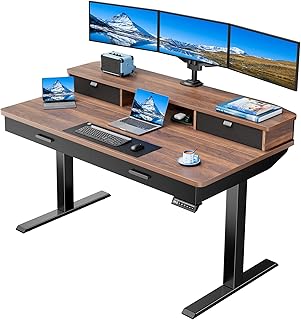
With a deeper 30-inch desktop, the HUANUO is one of the better choices for a full monitor setup, especially when you prefer a little distance between your screen and keyboard. Four drawers add useful organization, while the cable tray, grommet routing, and monitor-mount support help keep the larger surface orderly.
59-Inch Executive Standing Desk with Eight Drawers
This light-walnut desk is aimed at buyers who need abundant storage and a more substantial executive look. Eight drawers, a file cabinet, keyboard tray, privacy panel, and AC/USB connectivity create a capable command center, although its broad footprint and heavier visual presence are better suited to a dedicated office.
Frequently Asked Questions
Are standing desks with drawers stable?
They can be, but stability depends on the frame, desktop construction, weight distribution, and how high you raise the desk. Keep heavy equipment centered, avoid overloading drawers, and use a monitor arm only if the desk is designed to support one.
Do drawers make a standing desk harder to raise?
Drawers add weight, but a properly matched electric frame should accommodate the desk’s intended load. The practical concern is balance: filling one side heavily can make movement feel less even and may contribute to wobble at taller settings.
What height should a standing desk be?
Set it so your elbows sit close to 90 degrees while your shoulders remain relaxed and your wrists stay neutral. Your screen should be near eye level, and you should be able to alternate between sitting and standing rather than remaining in one position all day.
How much space does a standing desk with drawers need?
Measure the desktop width and depth, then add clearance for the chair, walking path, cable slack, and drawers opening fully. Corner and executive models need particular care because their storage can extend farther than the desktop suggests.
Final Thoughts
The HUANUO 55 x 30-Inch Standing Desk is the strongest all-rounder for a monitor-based home office, while the AODK 55-Inch offers a useful feature mix in a more approachable format. For maximum organization and an executive presence, the 59-Inch Eight-Drawer Desk is the better fit—provided your room has space for it.