Key takeaways
- Desktop size: A 48-inch-wide surface suits a laptop or single-monitor setup, while a 60-inch desk gives dual monitors, speakers, and paperwork more breathing room. Depth matters too; 30 inches feels noticeably more comfortable than 24 inches for larger screens.
- Height range: Check the minimum and maximum heights against your chair, shoes, and standing posture. The best range lets you keep elbows near 90 degrees without hunching or reaching upward.
- Stability: A heavy-duty steel frame and broad feet help reduce movement, especially at taller settings. Some motion is normal, but the desk should not sway whenever you type or adjust a monitor.
- Controls and lifting: Memory presets make switching positions effortless. Look for one-touch controls, a smooth motor, and a weight capacity that comfortably exceeds the combined weight of your desktop equipment.
- Home-office details: Cable trays, hooks, drawers, and organizers can make more difference than a small increase in lifting capacity. Also measure doorways and allow room behind the desk for cables and movement.
What's inside
Choosing an adjustable desk for a home office sounds simple until you compare lifting capacity, desktop depth, control panels, cable management, and the amount of room each model actually needs. A desk that looks ideal in a product photo can feel cramped with two monitors, wobble at standing height, or leave nowhere to hide a power strip.
This guide focuses on practical comfort rather than headline specifications alone. We compare five electric sit-stand desks for different home setups, from compact workstations to generously sized surfaces, and consider stability, storage, assembly, noise, and everyday usability. The Techni Mobili 51 Inch Classic Computer Desk is also worth considering if you prefer a fixed traditional workstation with drawers instead of motorized height adjustment.
As an Amazon Associate we earn from qualifying purchases.


How to Choose an Adjustable Desk (2026)
- Desktop size: A 48-inch-wide surface suits a laptop or single-monitor setup, while a 60-inch desk gives dual monitors, speakers, and paperwork more breathing room. Depth matters too; 30 inches feels noticeably more comfortable than 24 inches for larger screens.
- Height range: Check the minimum and maximum heights against your chair, shoes, and standing posture. The best range lets you keep elbows near 90 degrees without hunching or reaching upward.
- Stability: A heavy-duty steel frame and broad feet help reduce movement, especially at taller settings. Some motion is normal, but the desk should not sway whenever you type or adjust a monitor.
- Controls and lifting: Memory presets make switching positions effortless. Look for one-touch controls, a smooth motor, and a weight capacity that comfortably exceeds the combined weight of your desktop equipment.
- Home-office details: Cable trays, hooks, drawers, and organizers can make more difference than a small increase in lifting capacity. Also measure doorways and allow room behind the desk for cables and movement.
The Best Adjustable Desks (2026) Reviewed
FEZIBO 48 × 24-Inch Standing Desk
The FEZIBO Standing Desk is a sensible choice for a compact home office, bedroom workspace, or occasional-use desk. Its maple desktop brings a warmer furniture feel than an all-black workstation, while three customizable memory presets make it easy to alternate between sitting and standing without repeatedly searching for the right height. The 48-by-24-inch surface is best for a laptop, one monitor, or a tidy single-screen setup rather than a large collection of accessories.
ErGear 48 × 24-Inch Electric Standing Desk
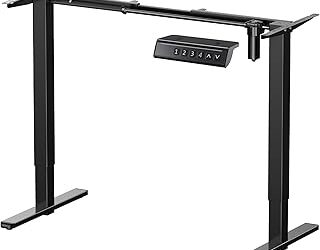
ErGear’s 48-by-24-inch model is appealing when dependable everyday controls matter more than extra desktop space. It offers four memory presets, one-touch adjustment, a stable steel frame, and a stated 176-pound capacity, giving it plenty of headroom for a conventional monitor setup. The black finish is easy to coordinate with office accessories, and the straightforward design should suit buyers who want a practical sit-stand desk without a bulky footprint.
VIVO DESK-KIT-1B6-P3B 60 × 30-Inch Standing Desk
This VIVO model is one of the strongest fits for a full home-office setup. The 60-by-30-inch top provides useful room for two monitors, a keyboard, notebook, and desk accessories, while the 220-pound capacity supports heavier equipment. A cable tray helps keep wiring under control, and the included full-size mouse pad is a convenient touch for anyone who wants a ready-to-use surface rather than a bare desktop.
Veken 47 × 28-Inch Standing Desk with Drawers
The Veken stands out for adding storage to the usual electric standing-desk formula. Its drawers, cable organizer, and hook are useful in smaller rooms where a separate filing unit or headphone stand would take up valuable floor space. The brown finish gives it a more domestic look, while three memory presets and a quiet lift keep the desk convenient during a typical workday. It is particularly attractive for students, hybrid workers, and bedrooms that need the desk to blend with surrounding furniture.
VIVO DESK-KIT-1B6B-30 60 × 30-Inch Standing Desk
For shoppers who want maximum working room, this VIVO 1B Series desk combines a 60-by-30-inch extra-deep top with a 220-pound lifting capacity. The additional depth is helpful for pushing monitors farther back while leaving space for a keyboard, writing area, or speakers in front. Memory presets simplify transitions, and the black frame has the clean, professional appearance many buyers want in a dedicated office. Measure carefully before ordering, since this is a substantial desk for a compact room.
Frequently Asked Questions
Are adjustable desks better than regular desks?
They can be, especially if you spend long periods working at a computer and benefit from changing position throughout the day. An adjustable desk is not a substitute for good posture, a supportive chair, or regular movement, but it makes alternating between sitting and standing much easier.
How tall should an electric standing desk be?
Set it so your elbows remain close to your sides and your forearms rest roughly parallel to the floor while typing. Your monitor should sit high enough that you are not constantly bending your neck, though the ideal setting varies with your height, footwear, and monitor stand.
How much desktop space do I need?
A 48-inch desk is usually adequate for a laptop or one-monitor arrangement. Choose a 60-by-30-inch model if you use two monitors, keep paperwork nearby, or prefer extra distance between your screen and the front edge.
Do adjustable desks wobble?
Some movement is possible because the desk becomes taller and less rigid when raised. A properly assembled frame on a level floor should remain comfortable for normal typing; keeping heavy equipment centered and avoiding an overloaded monitor arm can further improve stability.
Final Thoughts
The FEZIBO and ErGear are practical compact picks, with the FEZIBO offering a warmer maple look and ErGear providing an extra memory preset. For a larger dual-monitor workspace, choose the VIVO DESK-KIT-1B6-P3B; for built-in organization, the Veken is the more home-friendly option, while the deeper VIVO DESK-KIT-1B6B-30 is the best fit for equipment-heavy setups.